ComicID: Comic Book Scanner
- 3.7
- Rating
- 10.00K
- Installs
- Free
- Price

 Analysis by App-foxy
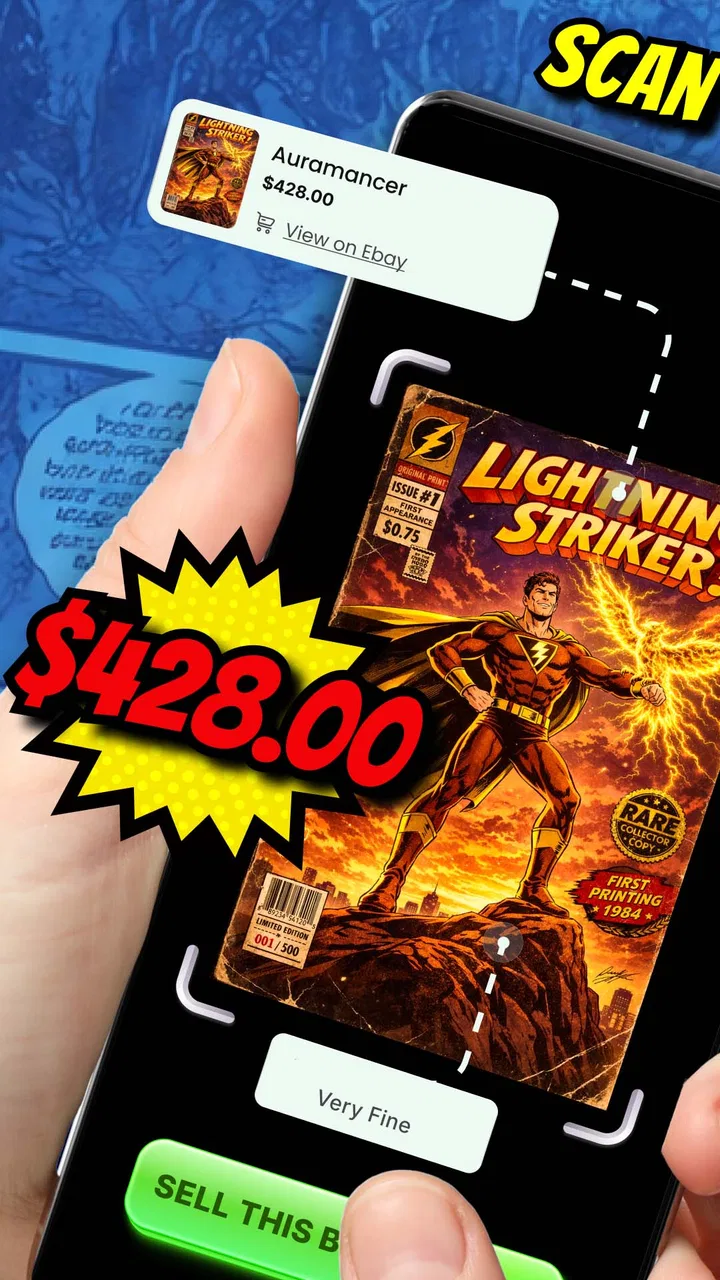
I like comic apps that solve a practical problem rather than simply putting another reading shelf on my phone. ComicID: Comic Book Scanner takes a different route: it is built for the moment when a comic collection becomes difficult to identify, organize, or prepare for sale. In my experience, that makes it more interesting than a standard digital comics reader, especially if you have boxes of mixed issues and only a vague idea of what is actually there.
The basic promise is easy to understand. You use the app to scan comics, let its AI help identify them, and then use that information as part of a selling workflow. It is a free comics app from The App Dude, with optional in-app purchases ranging from around five dollars to around nineteen dollars per item. The app is rated for Everyone, so its subject matter is accessible to a broad audience, although the practical value is aimed most clearly at collectors, inherited collections, casual sellers, and anyone trying to turn an untidy stack into something manageable.
From an Unsorted Box to a More Useful Collection
When I start with an unsorted box, I want a routine that keeps identification from turning into a second mess. This section looks at how I’d use ComicID to create manageable groups, check uncertain results, and decide which comics deserve more attention. That first pass also sets up the next question: how quickly the workflow feels once scanning becomes repetitive.
You May Also Like

 Pandora - Music & Podcasts
Pandora’s Music Is Easy to Start, but Harder to Recover
Pandora’s strength is its low-effort path from a seed to a station. Its weak spot is how much confidence it asks you to place in connection, setup, and quiet recovery.

 AccuWeather: Weather Radar
AccuWeather Review: A Quick, Clear Forecast for Everyday Decisions
For everyday plans, the best forecast is the one you can understand quickly. AccuWeather makes rain timing, radar, and local conditions easy to act on, with a few trade-offs.

 Hill Climb Racing
Why Hill Climb Racing Still Turns Crashes Into One More Run
A tiny car, a bumpy hill and one more upgrade: Hill Climb Racing keeps resurfacing because its simple chaos makes every near-miss feel personal.

 AliExpress - Shopping App
AliExpress Makes Global Shopping Feel Personal, but Shoppers Bear the Risk
AliExpress turns a global marketplace into a pocket-sized discovery engine. Its reach is useful, its shopping loop compelling, and its trade-offs easy to miss.

 Lords Mobile: Kingdom Wars
Lords Mobile Is a Kingdom-Building Routine, Not a Quick Match
A case-by-case verdict on the building, battles, device demands, and social commitments that make Lords Mobile rewarding for some players and exhausting for others.

 PDF Scanner app - TapScanner
TapScanner Makes Paperwork Easier to Capture, Check, and Share
TapScanner makes scanning with a phone feel less like a rescue operation and more like a dependable step in getting work done. Its capture tools are useful, though not flawless.
More From Our News Desk
View All News


The starting problem is more complicated than it looks
Imagine opening a long-stored box of comics. Some covers are familiar, others are faded, and several issues may belong to the same series but different story arcs. You may want to sell everything, keep the valuable items, or simply understand what you own. The usual alternative is manual searching: read the title, inspect the issue number, compare cover art, and search online one comic at a time.
That process is slow because identification is only the first step. A seller also needs consistent names, issue details, and a workable way to separate items into groups. A spreadsheet can help once the information is known, but it does not do much to recognize a comic from its cover. A general visual-search tool may find similar artwork, yet it is not designed around a collection workflow. ComicID sits between those options by focusing its experience on comic recognition and the next action a collector may take.
I would not approach it as a magic valuation machine. Identification and pricing are different jobs. A comic can be correctly recognized and still be difficult to price because condition, printing, completeness, demand, and market timing all matter. The useful mindset is to treat the app as a first-pass assistant: it can reduce the amount of detective work, while your judgement remains important before you list anything for sale.
Preparing the input makes the rest easier
The quality of the scan begins before the camera is pointed at a cover. I found it helpful to work in small batches instead of attacking an entire collection at once. Keeping a short group together makes it easier to check whether the result belongs to the right box, series, or owner. It also gives you a natural stopping point if a few unusual issues need manual attention.
Flat covers are easier to work with than comics lying at an angle or partly hidden under other books. Clear lighting matters too, particularly when the title is small, the cover has reflective wrapping, or a dark illustration blends into the background. I would remove visual clutter around the comic and make sure the important cover area is visible. These are simple habits, but they reduce the chance that the recognition step becomes the slowest part of the workflow.
There is also a useful trade-off between speed and review. Scanning quickly can help with a large collection, but accepting every result without checking it can create a messy catalog. A wrong issue number may look harmless at first and become a serious problem when you later try to group duplicates or prepare a sale. For that reason, I prefer a two-pass routine: identify first, then verify the entries that matter.
What the recognition step is good at
The strongest use case is a collection where the covers provide enough visual information to distinguish one comic from another. Instead of typing every title from scratch, you let the app do the initial recognition work. That can be especially helpful when you have several publishers, many unrelated characters, or issues gathered over years rather than purchased as a carefully maintained set.
AI recognition is most valuable as a shortcut, not as a replacement for looking at the physical item. Covers can be damaged, reprinted, variant editions can look similar, and older material may be harder to identify than a clean, distinctive modern cover. I recommend checking the displayed identity against the actual issue before treating it as final. Pay particular attention to the issue number, volume information, and any edition detail that affects a later sale.
This is one of the app's less obvious strengths: it changes the order of work. Without a scanner, I might research the most interesting-looking comics first and leave the ordinary ones untouched. With a recognition tool, I can process the collection in a consistent sequence and reserve deeper research for items that deserve it. That makes the app useful even when the AI result is only a starting point.
Turning recognition into a selling workflow
Once a comic has been identified, the practical question becomes what to do with that information. If I were preparing a collection for sale, I would divide the work into three groups: items that need closer checking, items that can be sold as part of a series or lot, and items I want to keep. This prevents the common mistake of treating every comic as an individual research project.
For a mixed box, I would first scan everything, then review duplicates and related issues. A run of consecutive issues may be more useful as a group than as scattered listings, while a single issue with a notable cover may deserve separate attention. The app can support the identification stage, but the handoff to selling still requires decisions about condition, photographs, descriptions, shipping, and the right marketplace.
This handoff is where expectations should stay realistic. ComicID is not the same thing as a full marketplace manager. Its value is in helping you know what you are handling before you write a listing. I would still take my own photos, inspect the spine and pages, and describe flaws honestly. A clean identification can improve a listing, but it cannot compensate for an inaccurate condition grade.
A realistic afternoon with the app
Consider someone who has inherited several boxes from a relative and wants to find out whether the collection is worth sorting. I would begin with one box, place the comics in a stable order, and scan them in manageable groups. As results appear, I would separate obvious duplicates and mark the issues that need a closer look. The first outcome would not be a finished sale; it would be a clearer map of the collection.
Next, I would inspect the physical condition of the most promising items. Covers with creases, detached staples, writing, missing pages, or water damage need to be recorded before any price discussion. I would then group related issues and decide whether the goal is a complete run, individual sales, or a quick bundle. The app helps move the process from “a pile of unknown comics” to “a set of identified items with different next steps.”
That distinction matters. If the owner only wants to donate the collection, detailed identification may not be worth the time. If the owner suspects there are valuable issues mixed in, scanning can make the initial sorting much more efficient. The same tool therefore serves different levels of commitment, but the benefit grows when the user is willing to review the results rather than stopping after the first scan.
Where the handoffs create friction
The first handoff is from a physical comic to a camera image. Poor positioning, glare, damaged covers, and visual similarity can make recognition less dependable. I would not scan a sealed or especially delicate comic carelessly just to improve the image. In those cases, protecting the item is more important than getting a perfect first attempt.
The second handoff is from an AI suggestion to a human-confirmed record. This is the point where patience pays off. A result that looks plausible may still represent the wrong issue or a related edition. If you are building a collection for sale, the cost of correcting a mistake later is higher than the few seconds spent checking it now.
The third handoff is from identification to market research. A recognized title does not automatically tell you what a buyer will pay. Condition and demand can vary widely, and online asking prices are not necessarily completed sale prices. I see the app as a way to narrow the search, not as a substitute for comparing current listings and learning the language collectors use for condition.
There is also a financial consideration. The app itself is free to start, but optional purchases are available, with individual items priced from around five dollars to around nineteen dollars. Before paying for anything, I would decide whether the collection is large enough or valuable enough to justify the extra cost. Someone checking a small personal stack may be perfectly satisfied with a limited workflow, while a seller processing many boxes may find additional paid functionality more reasonable.
How it compares with familiar alternatives
Manual cataloging remains the most controlled option. A spreadsheet lets you choose exactly which fields to record, add condition notes, and build a personal system that matches your collection. Its weakness is the amount of typing and searching required at the beginning. ComicID is more convenient for the recognition stage, but a spreadsheet may still be better for long-term notes and detailed inventory management.
General image-search tools can be useful when a cover is unusual or the app struggles with it. They may help locate a matching image, but they are not focused on the organization of a comic collection. I would use them as a backup for difficult cases rather than as the main workflow.
Dedicated collector databases may offer deeper cataloging, issue history, or specialized condition tracking. Those services can be preferable for an experienced collector who already knows the collection and wants a permanent archive. ComicID feels more approachable for the first pass, particularly when the main obstacle is recognizing what is in front of you.
Finally, a comic marketplace may be the right destination when your inventory is already organized and you are ready to sell. Marketplace tools are designed around listings and transactions, while this app is more useful earlier, when the collection is still being identified. Using the two types of tools together makes more sense than expecting one to handle every stage.
Who will get the most from it
I would recommend it to a casual collector who has lost track of a growing pile, someone sorting an inherited collection, or a seller who needs a faster way to identify mixed comics before researching them. It is also a good fit for people who enjoy the discovery part of collecting but do not want to begin with a blank spreadsheet.
The app is less suitable for anyone who expects automatic, authoritative valuations or a completely hands-off selling service. It is also not the first choice for a collector whose priority is detailed archival records, extensive condition history, or a carefully customized database. In those situations, manual tools or a specialist cataloging service may offer more control.
Because it is offered as a free app and carries an Everyone content rating, the barrier to trying the basic experience is low. The optional purchases change the decision for heavier users, so I would start with a small, representative batch rather than committing to a large workflow immediately. That test reveals whether the recognition quality fits your particular collection, especially if your comics are old, worn, international, or dominated by similar covers.
What I would do before listing anything
My preferred workflow ends with a manual quality check. I would compare each important result with the physical comic, inspect condition under good light, and photograph the actual item. I would keep notes about defects instead of relying on memory, particularly when several copies look nearly identical.
I would also separate identification confidence from sale confidence. A comic may be easy to name but hard to sell, or difficult to identify yet potentially worth more research. That distinction prevents the app from encouraging rushed decisions. The best result is not a list of impressive titles; it is a clean enough inventory that you know which items deserve your time.
Version 1.3 is the current release, and the app supports Android devices running version 7.0 or later. That broad system requirement makes it accessible on older compatible phones, which is useful when you want to use a spare device near a storage area. Still, the camera and lighting on the phone you choose will affect the experience more than the operating-system number alone.
My final take after following the full workflow
ComicID works best when I treat it as the front door to a collection project. It helps turn recognition into an organized next step, whether that means grouping issues, researching candidates, or preparing a sale. The real advantage is not that it removes every decision; it removes enough repetitive searching to let me spend my attention where it matters.
Its limitations are equally important. AI identification needs checking, physical condition still controls much of a comic's value, and the path from a scan to a completed sale includes several tasks outside the app. Users who understand those boundaries are likely to get more from it than users looking for an instant appraisal.
With an average rating of around 3.7 from over a hundred ratings, it has attracted a modest early audience rather than presenting itself as an established standard. I see it as a practical experiment for collectors who want to process a real box of comics more efficiently. If that is your starting problem, the free entry point makes it worth trying on a small batch. If your collection is already perfectly cataloged, or you need a specialist archive and precise valuation tools, another option may serve you better.
My recommendation is to use ComicID as an identification assistant, then take control of the verification and selling decisions yourself. That approach gives the app room to be genuinely useful without asking it to do a job it was never meant to replace.
FAQs for ComicID: Comic Book Scanner
01What is ComicID: Comic Book Scanner and how does it work?
ComicID: Comic Book Scanner is a mobile application designed to help comic book enthusiasts easily catalog their collections. By using your phone's camera, the app scans comic book covers to identify and retrieve detailed information such as issue number, publication date, and more. This makes managing and organizing your comic library seamless and efficient.
02Which platforms is ComicID available on?
ComicID: Comic Book Scanner is available for both Android and iOS devices. You can download it from the Google Play Store for Android users and the Apple App Store for iOS users. The app is designed to provide a consistent user experience across both platforms, ensuring that comic book fans can manage their collections regardless of their device choice.
03Does ComicID require an internet connection to function?
Yes, ComicID requires an internet connection to access its extensive comic book database and provide accurate information about scanned comics. However, once the information is retrieved and saved, you can access your collection offline. This feature allows users to browse their catalog anytime, even without an active internet connection.
04Are there any additional features in ComicID beyond scanning?
In addition to scanning, ComicID offers several features to enhance your comic book management. Users can create custom categories, track their reading progress, and even set up wish lists for future purchases. The app also allows users to export their collection data, providing flexibility in managing their comic book inventories.
05Is ComicID free, or does it require a subscription?
ComicID offers a free version with basic scanning and cataloging features. However, to access premium features such as advanced categorization, unlimited scans, and ad-free usage, users can opt for a subscription plan. This provides a more enriched experience, allowing comic enthusiasts to fully leverage the app's capabilities.
Pros
- Easy-to-use interface enhances user experience.
- High accuracy in text recognition.
- Supports multiple languages for global users.
- Saves comics as high-quality PDFs.
- Fast processing speed saves time.
Cons
- Limited editing features for scanned comics.
- Free version has frequent ads.
- Requires internet for some features.
- No cloud storage integration available.
- Occasional crashes on older devices.

ComicID: Comic Book Scanner
Gallery